
A while ago, support tools used in hiring were often limited to looking things up online. Today, AI tools can listen to an interview and suggest answers in real time. Because of that, hiring needs to change. The goal is not to “catch AI.” The goal is to make sure the candidate truly has the skills.
This article explains:
- when AI use is smart vs. dishonest,
- signs a candidate may be using AI,
- how candidates use AI at different stages,
- how teams can adapt,
- what “AI spam” looks like,
- how hiring may change next.
They will use AI anyway. Instead of fighting it, we should check if they use it wisely. – Krystian Kotynia, Delivery Manager at Relout
1) What is the difference between smart AI use and cheating in hiring?
The key question is not “Did they use AI?” It is: Did AI support their work, or did it replace their skills?
Everyone can read. Not everyone reads with understanding. Using AI is the same. – Kornelia Pytlak, Senior Recruiter at Relout
Smart use (usually OK)
AI can be reasonable when it helps the candidate:
- polish writing (CV, emails),
- organize their thoughts,
- prepare a clear summary of their experience,
- check grammar or structure.
In these cases, the candidate can still explain everything in their own words.
Cheating (not OK)
It becomes cheating when AI:
- gives answers the candidate does not understand,
- hides that the candidate lacks real experience,
- produces work the candidate cannot defend or explain.
2) How can you tell if a candidate is using AI dishonestly?
Using AI is not always bad. The risk starts when AI use comes with shallow knowledge. – Kornelia Pytlak, Senior Recruiter at Relout
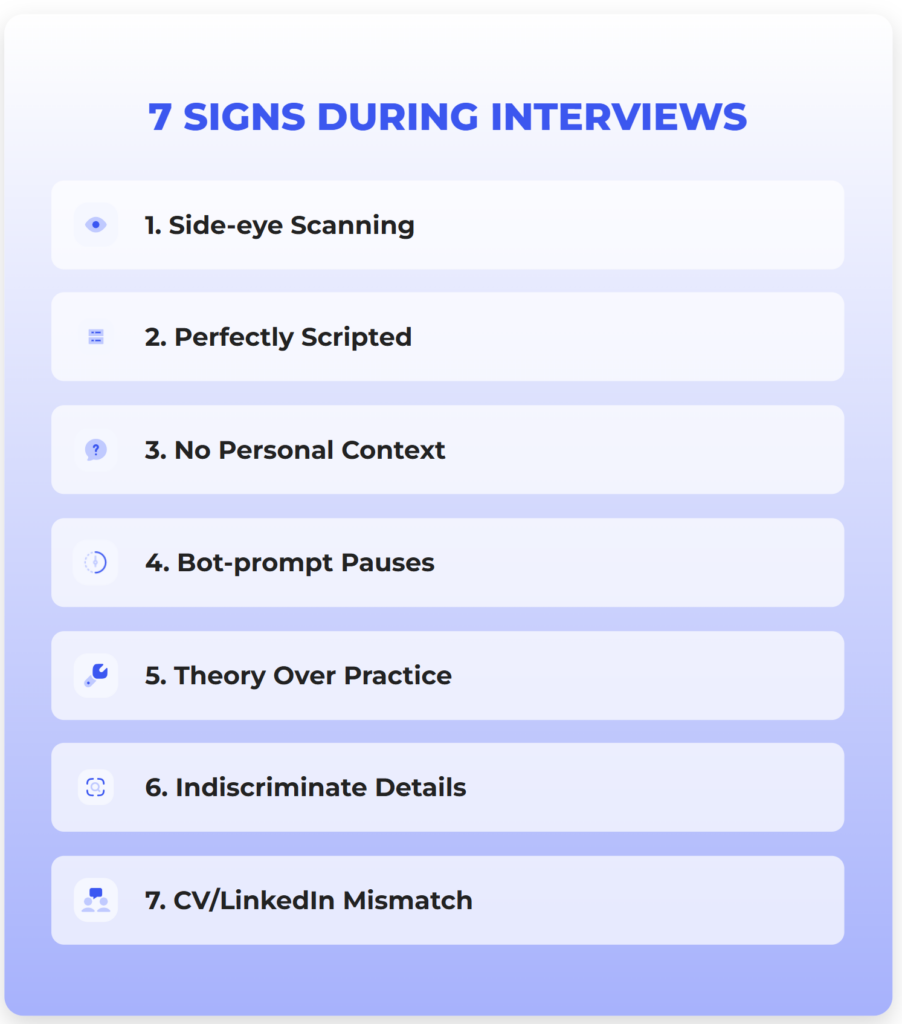
What are the 7 signs the candidate is using AI during a job interview?
During recruitment interviews, it’s worth switching on an extra radar. Here’s what should raise your concern:
- Eyes drifting to the side: The candidate doesn’t look at the camera, but their eyes quickly scan text outside the interview window. That’s a sign they’re reading an answer generated by a prompter.
- Perfectly structured responses: People don’t speak in bullet points. If every question gets an answer neatly arranged as a perfect list (“first… second… third…”), you’re probably listening to a script.
- Lack of personal context: AI handles theory very well, but it has no memories. If a candidate can’t give the name of a person they had a conflict with, or the name of the tool that “blew up” their production environment, that’s a red flag.
- Unnatural pauses: A moment of silence after a question that isn’t about thinking, but about typing a prompt into a bot.
- Overconfidence in theory, no practice: The candidate recites SOLID principles, but falls apart when asked how they’d apply them in a concrete, “messy” legacy project.
- Details nobody needs: Gerard Stańczak noted: “AI plows through everything indiscriminately. It can change functions that serve no purpose, and the candidate copies them because the bot told them to – without knowing why they did it.”
- CV doesn’t match LinkedIn: Mass-generated documents often include dates or job titles that don’t line up with the public profile.
Signs in written materials (CV, cover letter, take-home work)
You may see:
- A CV that matches the job ad too perfectly, but conflicts with LinkedIn or other details.
- Many CVs that look the same (same structure, same phrases).
- Keyword stuffing: the CV is full of tools and buzzwords, but with little context.
- Beautiful take-home work that is generic: looks professional, but choices are not explained.
3) At which stages of hiring do candidates use AI, and how?
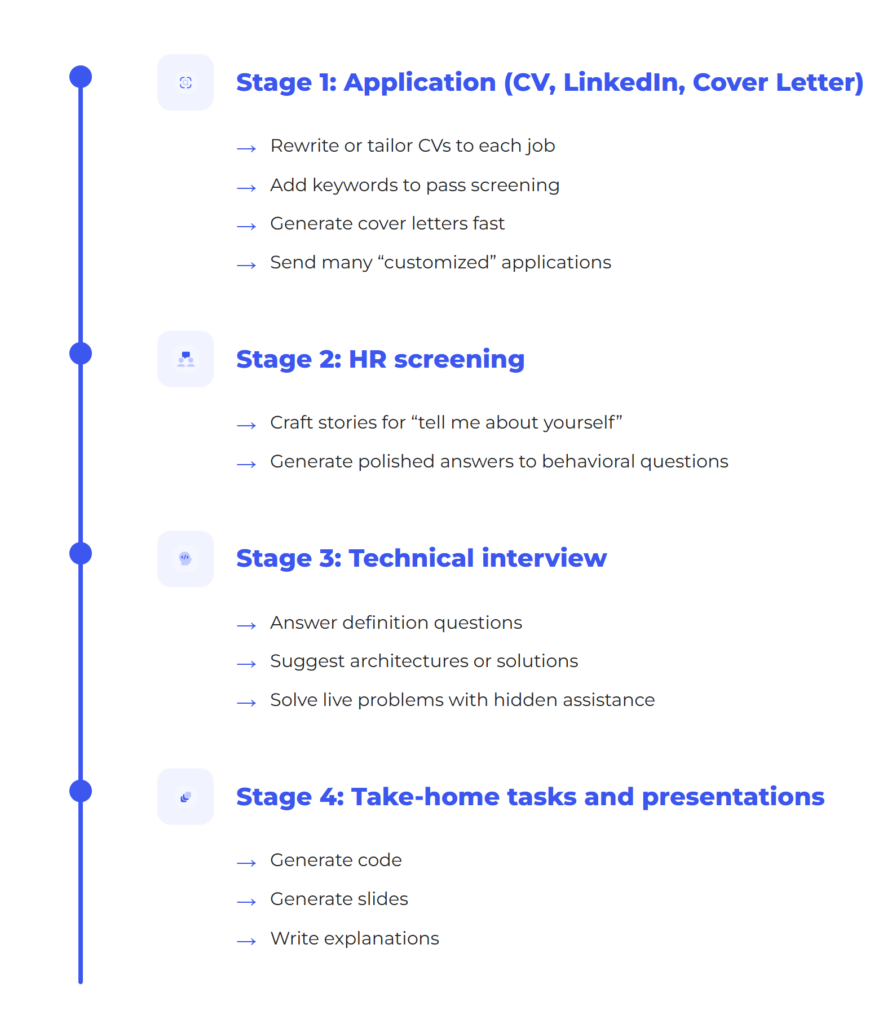
AI use changes by stage:
Stage 1: Application (CV, LinkedIn, cover letter)
Candidates use AI to:
- rewrite or tailor CVs to each job,
- add keywords to pass screening,
- generate cover letters fast,
- send many “customized” applications.
This can blur the real signal. A strong-looking CV may not reflect true skill.
Stage 2: HR screening
Candidates may use AI to:
- craft stories for “tell me about yourself,”
- generate polished answers to behavioral questions.
Stage 3: Technical interview
Candidates may use AI to:
- answer definition questions,
- suggest architectures or solutions,
- solve live problems with hidden assistance.
Screen sharing alone is not a reliable defense. Many tools can work around it.
Stage 4: Take-home tasks and presentations
Candidates may use AI to:
- generate code,
- generate slides,
- write explanations.
This is not always wrong – if they can explain and defend the work.
4) How to deal with it: methods that work
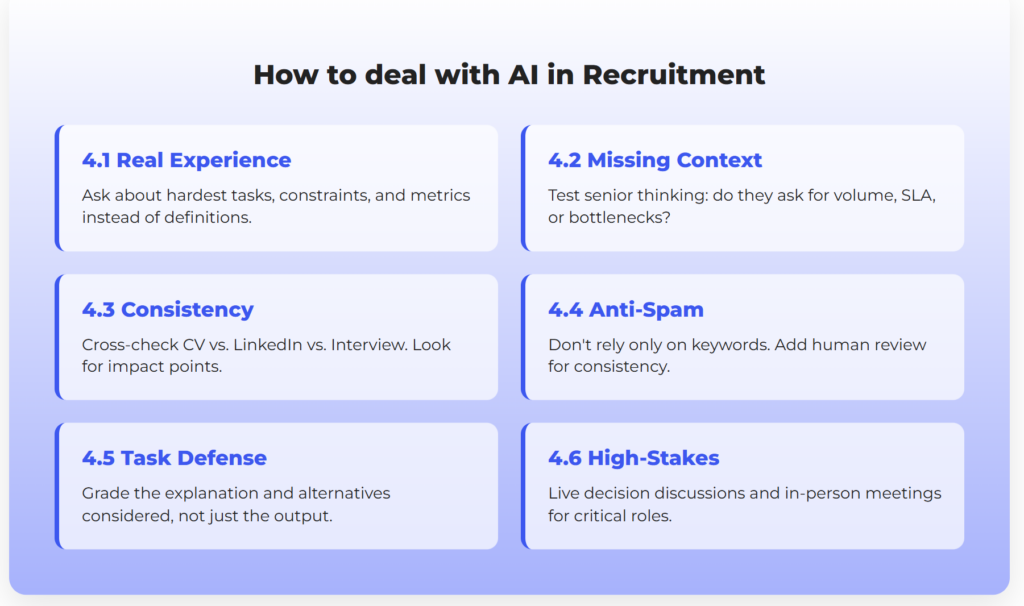
The best strategy is simple:
Design hiring so AI cannot create a false advantage.
If ChatGPT can answer your interview question and the answer is good enough, then it’s a bad question. – Gerard Stańczak, CEO of Relout
4.1 Ask about real experience, not definitions
Definition questions are easy for AI. Experience questions are harder.
Better questions:
- “Tell me about the hardest task you did in the last 3–6 months. Why was it hard?”
- “What constraints did you face (time, budget, legacy, security, team)? How did that change your decision?”
- “What metric did you improve, by how much, and how did you measure it?”
- “What would you do differently next time, and why?”
- “Who were the stakeholders and how did you get alignment?”
Then follow up with details. A real story has structure, trade-offs, and consequences.
4.2 Use “missing context” questions to test senior thinking
Senior candidates often respond to unclear questions by asking for context.
Example:
- Interviewer: “How would you optimize this process?”
- Strong candidate: “What is the volume? What is the SLA? Where is the bottleneck? What are the costs?”
AI-driven answers often jump straight to a generic recipe without asking key questions.
4.3 Cross-check consistency: CV vs. LinkedIn vs. interview
If a CV is AI-tailored, details may not match other sources.
A simple playbook:
- Pick 3 claims from the CV (project, dates, role).
- Ask for 2 impact points (result, metric, outcome).
- Ask for 1 failure or hard lesson.
Inconsistencies often appear quickly.
4.4 Protect against “AI spam” and weak screening
“AI spam” is mass applying with bot-tailored CVs.
A danger here is building a loop where AI generates applications and AI filters them. Then you may select people who are good at prompting, not good at the job.
Practical steps:
- Don’t rely only on keywords.
- Add a quick human review for consistency.
- Keep job ads focused – huge lists of buzzwords invite keyword stuffing.
4.5 For take-home tasks, grade the defense, not just the output
If AI is allowed, set clear rules:
- “You may use AI, but you must explain your choices.”
- “Tell us alternatives you considered and why you rejected them.”
- “Which parts are fully yours, and which were AI-assisted?”
If they cannot defend the work, the work has low value.
4.6 Extra verification for high-stakes roles
For critical roles, consider:
- deeper live discussion of decisions,
- a short practical session,
- an in-person meeting when possible.
5) “AI spam”: what it looks like
Teams are seeing patterns like:
- many applications arriving very soon after posting,
- similar CV formats and phrasing,
- “perfect fit” keyword lists with weak proof,
- inconsistent identity details or “apply to everything” behavior.
This does not mean the candidate is bad. It means the process must be stronger at checking reality.
5.1) Examples: what “generic” really looks like
Example 1: A generic cover letter
“I am excited to apply for the role. I am goal-oriented, a strong communicator, and eager to grow. I have experience with modern cloud tools, automation, and agile teams. I believe my skills will bring value to your organization.”
Why it is generic:
- no project names,
- no scale or results,
- no trade-offs,
- you can swap the company name and it still fits.
How to test it:
- “Name one automation you built. What was the before/after result?”
- “What was your exact role, and what did you own end-to-end?”
Example 2: A CV that mirrors the job ad
Signs:
- the skills section looks like a copy of the requirements,
- many tools listed, little context,
- weak project detail.
How to test it:
- “Pick one pipeline you built. What broke first? How did you fix it?”
- “Did you use Terraform in greenfield or maintenance? What standards and modules?”
Example 3: A perfect definition, no real proof
Candidate gives a flawless definition (for example, DDD).
You then ask:
- “How did you split domains in your last project?”
- “What problems did you hit, and what would you do differently?”
6) Have candidates changed in the last 12 months?
Numbers don’t lie:
- A Gartner survey conducted in Q4 2024 among 3,290 job candidates found that 39% used AI during the application process. Among those candidates, AI was most commonly used to generate résumé or CV content (54%) and cover letters (50%), followed by writing samples (36%) and responses to assessment questions (29%).
- AI and candidates: the use of AI in the job search process has become the norm – 81% of people already use or plan to use AI, and 48% say AI tools boost their confidence during interviews (LinkedIn). This significantly changes how real skills are assessed.
- Job applications: the number of applications per open role has increased significantly — in some cases doubling since 2022 according to LinkedIn – making it harder for recruiters to effectively review and evaluate submissions.
Over the past year, the job market has undergone a dramatic shift. AI has reshaped how skill levels are presented – we’re now seeing a surge of “artificial seniors.” With the help of AI tools, junior and mid-level candidates have learned how to sound highly competent. They can fluently use industry jargon that suggests years of experience, while their real-world decision-making and technical intuition often remain at a much lower level.
7) The future of hiring: what will change
Less value in definition questions
If a question can be answered by a prompt, it will stop being a good test.
More automation early on
Some early steps may use chatbots to collect information and standardize screening.
Risk: worse candidate experience
Candidates may feel “rejected by a machine,” which can harm trust. A good model is: bots collect info, humans decide and communicate.
Teams will “red team” their own process
A smart move is to test your hiring process using AI yourself, to find weak points and fix them.
Recruitment will not return to its old standards. PDF documents are becoming obsolete. The future lies in relationship-driven hiring and deep behavioral validation. We will spend less time reviewing résumés (AI will handle that for us), but significantly more time on genuine, human-to-human engagement with candidates.
“As long as work is done by people of flesh and blood, it has to be a human relationship.” Automation should help us filter out noise, but the final decision must be made at the human-to-human level.
Conclusion: a hiring process that works in the AI era
A strong approach can be summed up in six points:
- Assume candidates have AI. Don’t fight that – design around it.
- Test experience, decisions, and outcomes – not definitions.
- Drill down into details: numbers, constraints, trade-offs, lessons.
- Cross-check consistency across CV, LinkedIn, and interview answers.
- Watch for AI spam and avoid “AI judging AI” loops.
- For key roles, add deeper verification.
Need help with hiring?
If you feel your recruitment team is drowning in a flood of AI-generated noise and worry that your next “senior” might turn out to be a well-trained model – get in touch. We know how to build hiring processes where real talent always beats the bot.
It depends on how AI is used. If AI helps a candidate polish their writing or organize their thoughts, it’s generally acceptable. But if it generates answers or work the candidate cannot explain or defend, it crosses into dishonesty.
Recruiters can spot AI use by looking for signs like:
CVs that exactly mirror job ads
Keyword stuffing with little project context
Generic phrasing or identical formats across applicants
Mismatches between CVs and LinkedIn profiles
Ask experience-based questions such as:
“What did you build?”
“What failed and how did you fix it?”
“What metrics did you impact, and how?”
Then follow up with detail checks to see if they truly understand the project.
Using AI during live interviews is generally discouraged unless explicitly allowed. However, candidates may still try using tools covertly, so interviewers should focus on assessing depth of knowledge and real-world examples, not just textbook answers.
AI spam refers to mass job applications generated with AI tools. These often include:
– Overly optimized CVs full of buzzwords
– Fast, high-volume submissions
– Generic cover letters with no specific context or value